Archive
Tutorials
-
Managing View Templates with Revit links that are set to “By Linked View” per level
One of the biggest challenges of dealing with large Revit models is working with outside consultants’ linked Revit models. You may need to use a linked view to easily match said consultant’s floor plan views. In that case, you should use the By Linked View V/G setting of your RVT Link. The problem you will face…

-
[Solved] Revit Error: Unable to make the necessary Workset (Project Info) editable in the Linked File in order to change the Shared Coordinates.
While attempting to link an architectural Revit model into my electrical model, an interesting error message popped up: “Unable to make the necessary Workset (Project Info) editable in the Linked File in order to change the Shared Coordinates.” This was a new one for me. When attempting to open these models, you can’t uncheck the…
![[Solved] Revit Error: Unable to make the necessary Workset (Project Info) editable in the Linked File in order to change the Shared Coordinates.](https://blog.triplezero.xyz/wp-content/uploads/2016/10/Revit-2017-MEP-Architecture-Structural-672x350.png)
-
[Solved] Revit does not display vertical elbows (i.e., risers in shafts) properly in plan view
Let’s talk a little about Plan Regions in Revit. In a nutshell, this tool helps to show areas of a View that may need to deviate from your view’s View Range. Aside from the common uses for this in architecture, mechanical designers can actually get their risers to display properly when using a vertical elbows. The Problem Mechanical…
![[Solved] Revit does not display vertical elbows (i.e., risers in shafts) properly in plan view](https://blog.triplezero.xyz/wp-content/uploads/2016/10/cut-tree-1465398465yRa-672x372.jpg)
-
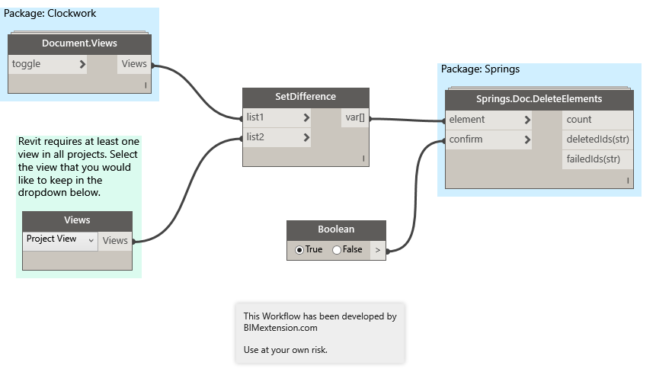
Use Dynamo to delete all views in Revit
I have been working on a Dynamo Workflow that will purge out all views and sheets from a Revit model. Yes, there are several add-ins that currently accomplish this task, however I eventually want to create a “Super Purge” Workflow that will purge a model of all views, sheets, and elements for me. More on…
-
Revisions from a revision schedule in a titleblock family are not populated on sheets
Today I was challenged with figuring out why a revision schedule from a titleblock family was not showing the revisions on the sheet that the titleblock was placed on. I found a subtle setting in which I’ve never used before – it is to set a fixed Height of the revision schedule. I suppose this could…

-
Rotate a section to line up to an angled element in Revit
I remember my early days of Revit and working with architecture that had several angles in plan view. Cutting a section without knowing the exact angle is difficult in Revit and the Align tool currently does not work on section lines. Here is a workaround to rotate your sections to align with any angle within Revit. 1) Draw…

-
[Solved] Revit can’t create a new module in the macro manager
This morning, I ran into an interesting bug in Revit 2016. I opened up my Macro Manager per the norm, but when attempting to create a new module Revit wouldn’t save the new module. It successfully opened the dialog box to let me choose a name, language, and description, however once I clicked “OK” nothing…
![[Solved] Revit can’t create a new module in the macro manager](https://blog.triplezero.xyz/wp-content/uploads/2016/01/source-code-583537_960_720.jpg)
-
A Review of BIM Track – A platform for BIM Coordination and Collaboration
While running some BIM coordination exercises at an MEP firm, I had the opportunity to test a new product, BIM Track. While the product may not necessarily be new, it is new to me. Overview From the BIM Track website: BIM Track™ is a web-based collaboration platform that empowers your team with better coordination workflows.…

-
IronPython UI Generator and Script Library for Autodesk Revit
I just stumbled on this script library for Revit users who wish to use Python with the Revit API. In it’s simplest form, it’s a folder of IronPython .py scripts for Autodesk Revit. Check it out on GitHub: https://github.com/eirannejad/pyRevit There is plenty of example code written in Python that you can refer to when learning to create…

-
Here’s why your Revit families hosted to reference planes may appear upside down
Hosting elements to reference planes in Revit is a technique used by many, but only fully understood by few. The most overlooked part of the entire process is drawing the reference plane itself. Did you know that there are differences between drawing a reference plane from right to left versus drawing one from left to right?…