Archive
Revit Macro
-
How I Used AI To Recreate The Iconic Structure in King’s Cross Station With A Revit Macro
Here’s what happened when I challenged an AI to model the complex structure of King’s Cross Station in Revit. No Dynamo, just raw C# as a Revit macro.

-
How I Used AI to Downgrade a Revit Family From 2024 to 2022
What if Revit families were backwards compatible? Could we use AI and a little C# coding to force Revit 2024 to talk to Revit 2022?

-
Is Dynamo Dead? Here’s How AI is Bringing Revit Macros (C#) Back To The Forefront.
With the emergence of AI as a coding partner, I’ve found myself leaning back into the Revit Macro Manager. The barrier to entry for text-based coding has nearly vanished, and the results are cleaner, faster, and more robust than anything I could “wire up” in Dynamo.

-
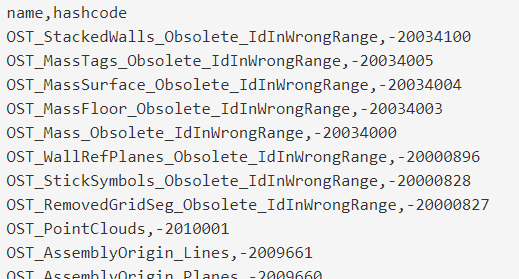
Revit BuiltInCategory Enumeration (2018.3)
I searched and searched for hours and still have not found a list of all members of the BuiltInCategory enum along with their hashcodes. This is very helpful for working with shared parameters which need the DATACATEGORY value, as you cannot use the name of the built-in category (Revit looks for the hashcode in the…
-
[Solved] Revit can’t create a new module in the macro manager
This morning, I ran into an interesting bug in Revit 2016. I opened up my Macro Manager per the norm, but when attempting to create a new module Revit wouldn’t save the new module. It successfully opened the dialog box to let me choose a name, language, and description, however once I clicked “OK” nothing…
![[Solved] Revit can’t create a new module in the macro manager](https://blog.triplezero.xyz/wp-content/uploads/2016/01/source-code-583537_960_720.jpg)
-
IronPython UI Generator and Script Library for Autodesk Revit
I just stumbled on this script library for Revit users who wish to use Python with the Revit API. In it’s simplest form, it’s a folder of IronPython .py scripts for Autodesk Revit. Check it out on GitHub: https://github.com/eirannejad/pyRevit There is plenty of example code written in Python that you can refer to when learning to create…

-
Copy a Legend to Multiple Sheets in Revit
The good folks over at Boost Your BIM have posted a macro for copying a legend to multiple sheets. It works really well, but I wonder if anyone would like to take on the challenge of doing something similar in Dynamo. public void legendOnSheets() { Document doc = this.ActiveUIDocument.Document; // create list of element ids for…
-
Revit Macro – List electrical panel schedules and the sheets that they are placed on
We found a quick-and-dirty way to show what sheets your electrical panel schedules are on. Essentially, it is a schedule of schedules. We haven’t found any other way to accomplish this as of yet and we welcome any improvements to this code. What this does is simply create a dialog box with all of your…