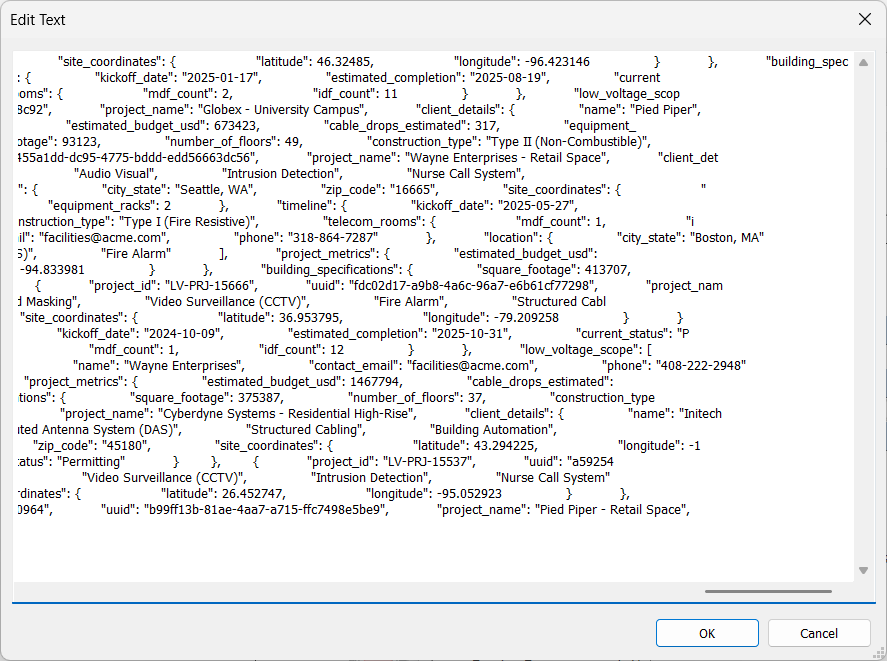
Story time: I was working on developing a Revit addin for a client which required a JSON blob as an input (generated from another application). Of course the BIM manager in me immediately thought, “I’m going to need a ton of shared parameters for this data.” Then my developer brain questioned, “but wait, is there a way to store JSON in Revit?”
That’s when I thought of the insane idea to dump the raw JSON into a single MULTILINETEXT shared parameter. You remember this datatype, right? TheBIMsider presented this as a way to add line breaks to a parameter value over 10 years ago.
Long story short, I took the JSON payload and pasted it directly into the parameter of a single element. To my absolute shock, Revit didn’t even blink. I successfully stored 3,511 lines of formatted JSON in a single MULTILINETEXT shared parameter. That is over 100kb of pure data, sitting quietly inside one field on one object (or in my case, a Project Information project parameter).
And now the million dollar question: If Revit can comfortably hold this much structured data in a single parameter, what stops us from using it as a localized, NoSQL database for the project or any specific element? We could easily develop a lightweight Revit add-in that runs in the background, reads this MULTILINETEXT parameter, parses the JSON payload on the fly, and interacts with it via a custom UI. An add-in could easily modify the JSON and write it back to the single parameter.
Now, that we’ve discovered that we CAN store JSON in Revit, let’s think through if we SHOULD.

This begs a thought-provoking question: Is this a totally new way to store BIM data in Revit? And more importantly… is this actually a good thing, or a terrible idea?
On one hand, this approach feels like it is killing our data standards. The traditional Revit philosophy relies heavily on Shared Parameters. Shared Parameters are rigid, structured, and strictly typed (Text, Integer, Length, etc.). They force a hard data standard across a project and across a firm. If you use a single “JSON Dump” parameter, it’s the Wild West. You can’t natively schedule JSON keys in an out-of-the-box Revit schedule. You can’t easily filter by a nested JSON value using native view filters. If you rely on native Revit tools, this breaks the “I” in BIM by hiding the data behind a wall of code.
On the other hand, this opens up an unbelievable level of flexibility. Let’s be honest—parameter bloat is a real disease in the BIM industry. Opening up a project with 1,000 shared parameters is an absolute nightmare. Not every door needs a “Maintenance_Schedule_Notes” parameter, but right now, if one door needs it, the parameter has to exist in the project.
By storing JSON in a MULTILINETEXT field, it opens up the ability to dump highly specific, asymmetrical data into a project or an element without creating a shared parameter for every single data point. An air handling unit could hold a complex array of IoT sensor IDs, warranty milestones, and sub-component specs, while a generic wall holds nothing—all without polluting the project’s parameter list. Furthermore, because it’s JSON, syncing element data with external web dashboards, databases, or APIs becomes incredibly seamless. No more mapping 50 individual Revit parameters to 50 database columns; just push and pull the JSON payload.
One Advantage: JSON is the LLM language that AI speaks.
Besides the extensibility of not requiring shared parameters for every data point, there is one more layer to this debate that we can’t ignore: Large Language Models (LLMs).
Right now, extracting a building’s worth of fragmented, rigid Shared Parameters and formatting them in a way that an AI like ChatGPT or Claude can actually understand requires some serious API gymnastics. It is clunky and computationally expensive.
But JSON? JSON is the native love language of LLMs.
When you store data as a JSON payload inside a MULTILINETEXT parameter, you are essentially making that data “AI-ready” right out of the box. An LLM can instantly read, understand, and manipulate a 100kb JSON string without batting an eye.
By abandoning the traditional parameter structure and embracing JSON, we aren’t just making it easier for developers to interact with our models. We are inadvertently creating a direct, frictionless pipeline between BIM data and Generative AI.
Minus Points: BIM data stored as JSON would require a special tool to read and modify.
But before we throw our shared parameter files into the digital trash, we have to talk about the elephant in the room: editability.
Revit doesn’t natively speak JSON. If an architect, engineer, or contractor clicks on an element and looks at the Properties Palette, they aren’t going to see neatly organized data fields. They are going to see a terrifying, unreadable wall of code crammed into a single text box.
Because of this, you wouldn’t be able to edit this data natively in Revit, at least, not safely. If a user tries to manually update a manufacturer name in that MULTILINETEXT box and accidentally deletes a single comma or quotation mark, the entire 100kb data structure breaks.
To actually make this workflow viable, you are forced to build a middleman. You must develop and maintain a custom Revit add-in with UI, a Dynamo script, or an external web app just to read and write the data.
Traditional BIM thrives because anyone on the project team can click a door and easily read or change its fire rating. By stuffing everything into JSON, we risk locking our building data behind a wall that only developers and tech-savvy BIM managers can climb.
Someone please convince me that this is a bad idea.

It’s a massive paradigm shift. It can replace rigid, scheduled parameters with dynamic, developer-friendly data structures. But still, there are lots of red flags. So, I turn it over to my readers. I know this is going to ruffle some feathers in the BIM management community, but I want to hear your takes:
Is this a brilliant hack that solves parameter bloat, or is it a data management nightmare waiting to happen? Are we evolving beyond rigid Shared Parameters, or just creating a new kind of mess?
Drop your thoughts in the comments below—I really want to see where the community stands on this!
Leave a Reply