Archive
Revit
-
BIMxHTML – A Dynamo Package to Generate Web Pages
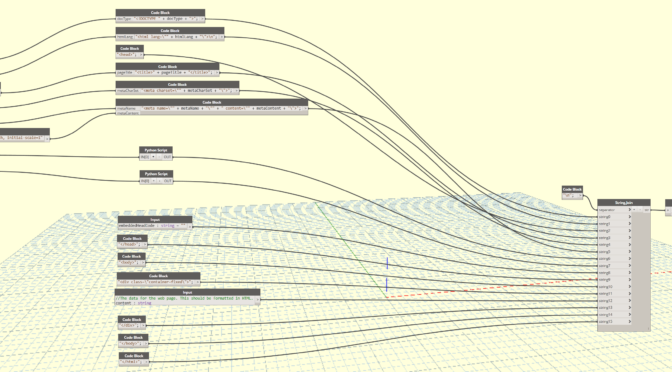
All of the excitement revolving around generating dashboards using Power BI made me wonder: Can we leverage Dynamo to create web pages that display data directly from a Revit model? The goal would be to create a powerful, free alternative to generating web-based content using simple HTML code. Needless to say, the gears have been…
-
The Value of Standardized Shared Parameters
This post was originally posted to OpenRFA.org on May 8th, 2017 and is shared here for posterity. In Revit, shared parameters are unique – each shared parameter has its own Globally Unique Identifier (GUID) assigned at time of creation. This means that just like a person, parameters can have the same name but never the…

-
Seattle Dynamo User Group
Rather than hosting a Dynamo training session in the greater Seattle area, we decided to organize and sponsor the Seattle Dynamo User Group Meetup! The meetup group was only formed on February 1, 2017 and we already have 17 members. We will schedule the first meetup as soon as we have speaker and a venue…

-
Linked Mechanical IFC Model Into Revit; Can’t See Ductwork
Tonight (yes, I am working on a Friday night), I ran into a new issue that I thought the community might be interested in. I linked an IFC into Revit which was exported from AutoCAD MEP. The issue is, I could not see any of the duct. Autodesk posted a solution to the problem that unfortunately…

-
PSA: The Air Terminal category in Revit is DuctTerminal in Dynamo
Looking for the Air Terminal category in your Categories node Dynamo? You won’t find it. It’s called DuctTerminals in Dynamo. That is all.

-
Managing View Templates with Revit links that are set to “By Linked View” per level
One of the biggest challenges of dealing with large Revit models is working with outside consultants’ linked Revit models. You may need to use a linked view to easily match said consultant’s floor plan views. In that case, you should use the By Linked View V/G setting of your RVT Link. The problem you will face…

-
[Solved] Revit Error: Unable to make the necessary Workset (Project Info) editable in the Linked File in order to change the Shared Coordinates.
While attempting to link an architectural Revit model into my electrical model, an interesting error message popped up: “Unable to make the necessary Workset (Project Info) editable in the Linked File in order to change the Shared Coordinates.” This was a new one for me. When attempting to open these models, you can’t uncheck the…
-
[Pop quiz] What’s wrong with these views?
Do you see anything wrong with how these views are set up? Add a comment below to let us know what you would do differently.
![[Pop quiz] What’s wrong with these views?](https://blog.triplezero.xyz/wp-content/uploads/2016/10/6514526225_d3ff488267_b-672x372.jpg)
-
[Solved] Revit does not display vertical elbows (i.e., risers in shafts) properly in plan view
Let’s talk a little about Plan Regions in Revit. In a nutshell, this tool helps to show areas of a View that may need to deviate from your view’s View Range. Aside from the common uses for this in architecture, mechanical designers can actually get their risers to display properly when using a vertical elbows. The Problem Mechanical…
![[Solved] Revit does not display vertical elbows (i.e., risers in shafts) properly in plan view](https://blog.triplezero.xyz/wp-content/uploads/2016/10/cut-tree-1465398465yRa-672x372.jpg)
-
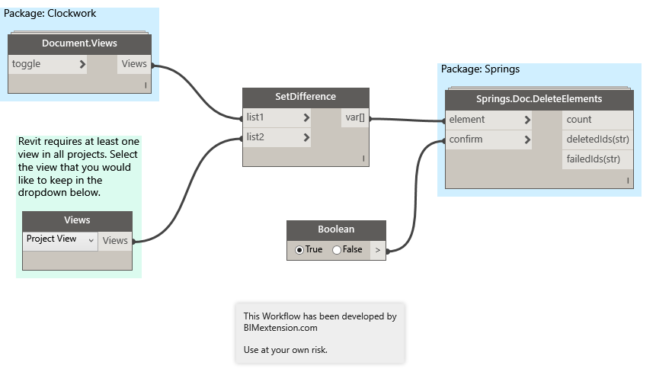
Use Dynamo to delete all views in Revit
I have been working on a Dynamo Workflow that will purge out all views and sheets from a Revit model. Yes, there are several add-ins that currently accomplish this task, however I eventually want to create a “Super Purge” Workflow that will purge a model of all views, sheets, and elements for me. More on…