Archive
Revit API
-
Programmatically Retrieve all Shared Parameters in a Project Model using The Revit API
A few months ago, I shared a post on OpenDefinery about a simple solution to fully purge Shared Parameters from a Revit project model. In that post, I shared my discovery that Shared Parameters have an Element ID just like any other model element, which means you can select the parameter through the Revit UI using…

-
Revit BuiltInCategory Enumeration (2018.3)
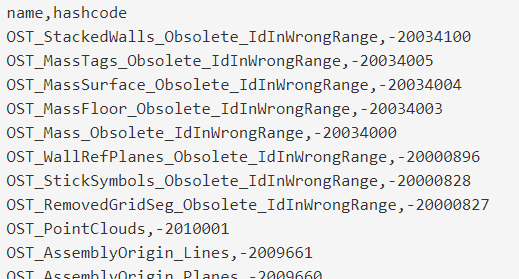
I searched and searched for hours and still have not found a list of all members of the BuiltInCategory enum along with their hashcodes. This is very helpful for working with shared parameters which need the DATACATEGORY value, as you cannot use the name of the built-in category (Revit looks for the hashcode in the…
-
Use Dynamo to Transfer Phase Data to Bound Revit Models
This workflow was created as a request from @PhilosophyBIM on Twitter To @DynamoBIM guru, any way to automate the phase mapping to revit elements? I have a linked model binded to another file & lost all Phases. — Philip Chan (@PhilosophyBIM) September 26, 2017 The issue arises when binding a linked model in Revit. If…

-
BIMxDB v0.0.2 Published – Store Revit Data in SQLite Database
To supplement the BIMxHTML Dynamo package, I published a second package called BIMxDB. This package will contain several custom nodes for exporting Revit data to different types of databases. For now, my focus is SQLite and the current node that is in the package is Export.SQLite.ParameterData.TimeStamped. This custom node creates a table in the SQLite…

-
Hello Dynamo World!
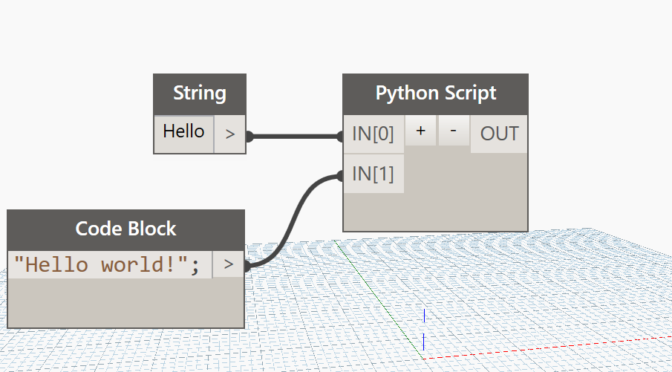
In learning every new programming language, it is customary to start with a “Hello world!” application. Although visual, Dynamo is a scripting tool as well, so I thought this would be a great first step for folks who are new to Dynamo. In this post, we demonstrate how to display “Hello world!” in the Revit…
-
Seattle Dynamo User Group
Rather than hosting a Dynamo training session in the greater Seattle area, we decided to organize and sponsor the Seattle Dynamo User Group Meetup! The meetup group was only formed on February 1, 2017 and we already have 17 members. We will schedule the first meetup as soon as we have speaker and a venue…

-
[Solved] Revit can’t create a new module in the macro manager
This morning, I ran into an interesting bug in Revit 2016. I opened up my Macro Manager per the norm, but when attempting to create a new module Revit wouldn’t save the new module. It successfully opened the dialog box to let me choose a name, language, and description, however once I clicked “OK” nothing…
![[Solved] Revit can’t create a new module in the macro manager](https://blog.triplezero.xyz/wp-content/uploads/2016/01/source-code-583537_960_720.jpg)
-
IronPython UI Generator and Script Library for Autodesk Revit
I just stumbled on this script library for Revit users who wish to use Python with the Revit API. In it’s simplest form, it’s a folder of IronPython .py scripts for Autodesk Revit. Check it out on GitHub: https://github.com/eirannejad/pyRevit There is plenty of example code written in Python that you can refer to when learning to create…

-
Copy a Legend to Multiple Sheets in Revit
The good folks over at Boost Your BIM have posted a macro for copying a legend to multiple sheets. It works really well, but I wonder if anyone would like to take on the challenge of doing something similar in Dynamo. public void legendOnSheets() { Document doc = this.ActiveUIDocument.Document; // create list of element ids for…
-
How to get a nested list item by index in Dynamo (the easy way).
I found a super simple way to get a nested list item at index using Design Script using a single node. The Code Block in the example: x[0][33][1]; Where: x = Input for your list [0] = Parent List [33] = The nested list item #1 within Parent [1] = The…
