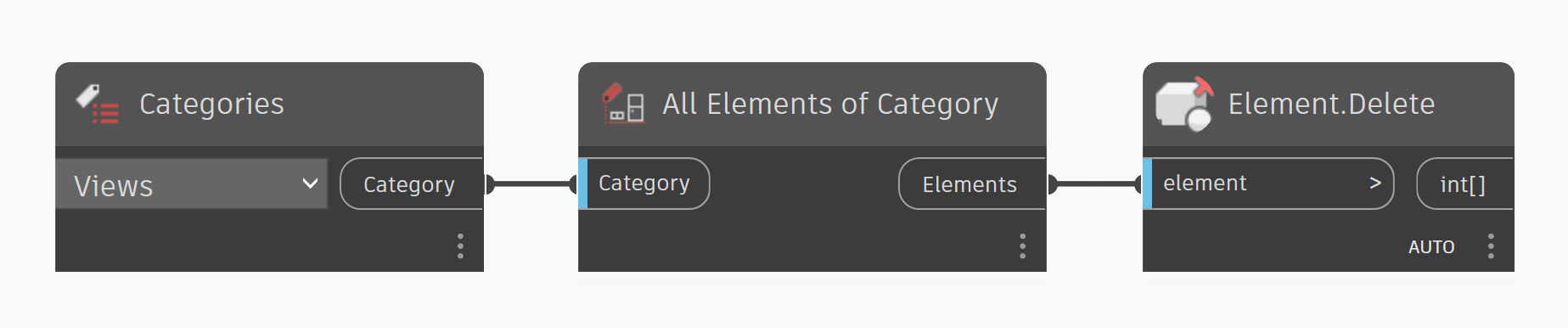
Use Dynamo to delete all views in Revit (Updated for Dynamo v2.x)
We have all been there. You receive a model from a consultant or a partner firm, and it is absolutely weighed down by hundreds of working views, temporary sections, and unorganized elevations. Before you can link this model into your project or start your own work, you need to “clean up” the file to ensure performance and clarity.
Manually deleting hundreds of views is tedious and time-consuming. To solve this, I previously shared a Dynamo graph to automate the process. However, seeing as that post is almost 10 years old, the graph was developed for Dynamo v1.x. It is time for an update.
Key Improvements
- No Custom Packages: The biggest change in this version is the removal of dependencies. You no longer need to hunt down specific versions of the Clockwork or Springs packages.
- We no longer need to keep a view in the model, so we’ve eliminated those nodes completely.
Download the Graph
Ready to automate your model cleanup? You can download the updated Dynamo 2.x graph below.
WARNING: Always remember to back up your model before running a script!
Delete-all-Views-v2.x.dyn (133 downloads )