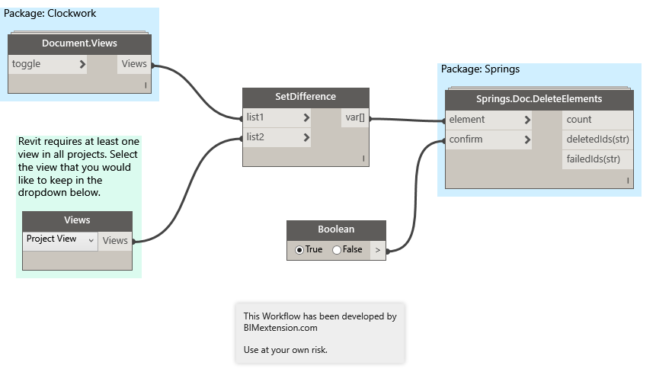
I have been working on a Dynamo Workflow that will purge out all views and sheets from a Revit model. Yes, there are several add-ins that currently accomplish this task, however I eventually want to create a “Super Purge” Workflow that will purge a model of all views, sheets, and elements for me. More on that to come.
NOTE: The below solution is not only for Dynamo v1.x. Refer to my updated post which has been updated for Dynamo 2.x and also does not require the Clockwork and Springs packages.
Requirements:
- Clockwork
- Springs
- Dynamo
The Workflow
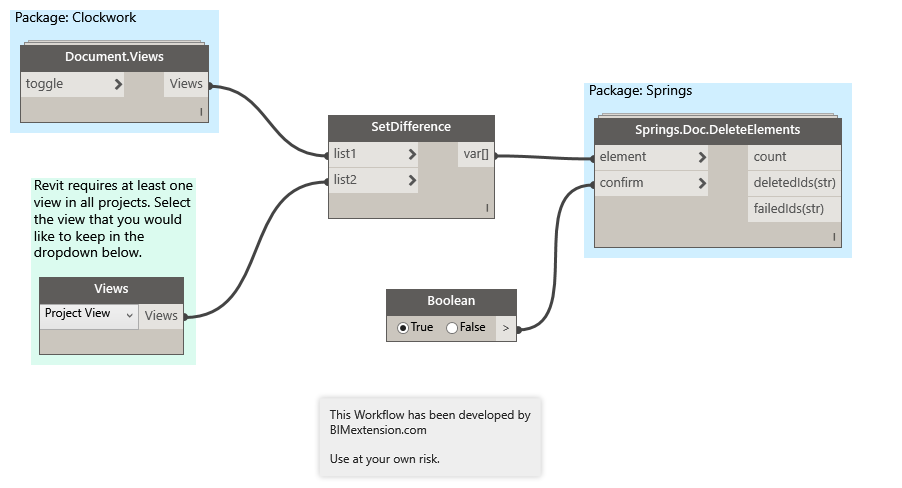
The SetDifference node is grabbing all views in the current document from the Document.Views node and removes the user-specified view to keep in the model from the Views node. Note that Revit maintains the requirement to have at least one view within a project.
Then, the Springs.Doc.DeleteElements node deletes all views (except for the one chosen in step one).
Download
Special Thanks
A special thanks goes out to the good folks at DynamoBIM.com for helping me out with this solution.
Leave a Reply