
We made a major decision recently: Ephany is no longer a licensed SaaS product. Instead, we have released the entire framework as an open-source API.
Why the pivot?
Because we believe the era of buying rigid, “one-size-fits-all” software for every niche workflow is ending. With the explosive adoption of AI, organizations are increasingly becoming self-serving software developers themselves, building custom internal tools, automations, and dashboards tailored to their specific needs.
That’s why we saw an opportunity to open-source Ephany. Rather than selling yet another set of licenses for your team to purchase, we would rather provide a (free) jumping-off point for teams to build their own tools and automations (AI or not).
The API is a standardized framework for your asset data that you can own, extend, and build upon. Your organization can finally own your data and the source code to boot.
What is the Ephany Framework?
If you manage any data related to asset (FF&E) across a fleet of projects, you know the “data trap”.
You have thousands of assets that your track, including metadata, Revit families, details, and specifications. But that data is dumped in spreadsheets, locked in Revit container files, buried in Windows folders, or trapped in a rigid, proprietary content management platform that doesn’t quite fit your workflow.
If you want to know, “Which projects are using the unapproved generator?” or “How many Herman Miller chairs do we have across the entire program?”, you usually have three bad options:
- Open every model and check manually.
- Review every PDF set of drawings and hunt for data.
- Export 50 spreadsheets and merge them in Excel.
We don’t need another button on the Revit ribbon. We need infrastructure.
The Solution: Headless Asset Management with Ephany

Ephany is not a web app. It’s not a Revit addin. It is an API-first Asset Management Framework.
In software development, “headless” means the data (the backend) is separated from the interface (the frontend). Ephany acts as the central brain for your asset data, independent of any specific software. It doesn’t care if you use Revit, ArchiCAD, or Rhino. It stores your asset standards and their project relationships in a neutral, open database that anything can talk to.
How It Works (In Plain English)
Think of Ephany as a universal translator for your library.
- The Source: You have your assets (families, specs, images).
- The Brain (Ephany): You push this data into Ephany. It assigns everything a unique ID and tracks relationships (e.g., “Asset X is used in Project Y, Snapshot Z”).
- The Destination: This is the magic part. Because Ephany is an API, you can pull that data into any tool you want.
- The Future: Ephany is scalable. If we don’t have a data point built into the framework that you need, add a custom field in Ephany and assign that values your team needs. Automate the management of existing data. The future is yours.
Instead of your data being stuck in a stack of files, it’s in a database. A database which can be easily read from or written two using the Ephany API.
How It Works (In Geek Speak)
When you ask for asset data via the Ephany API, you’ll get a response in plain text (formatted as JSON) and it will look something like this:
{
      "id": 2,
      "type_id": "AVN-2",
      "manufacturer": {
        "id": 3,
        "name": "Avantco",
        "url": "https://www.avantcorefrigeration.com/",
        "logo": "http://framework.ephany.io/media/manufacturers/logo_3.png"
      },
      "category_name": "Refrigerators - Closed Door",
      "model": "SS-3R-HC",
      "name": "81 5/16\" Stainless Steel Solid Door Reach-In Refrigerator",
      "url": "https://www.avantcorefrigeration.com/product/178SS3RHC",
      "overall_height": 2082.7999999999997,
      "overall_width": 2057.4,
      "overall_depth": 812.8,
}
What the heck is that?
If you are a BIM Manager, you live in tables of data: you understand data formatted in Excel, Smartsheet, and/or Revit schedules. You read and write data in rows, columns, and headers. But when you start working with APIs, Python, or even Dynamo, you suddenly encounter a wall of text filled with curly braces {} and colons :.
This is JSON (JavaScript Object Notation).
Don’t let the “JavaScript” part scare you. Think of JSON as a list view of a table. It formats structured data as a list of objects and their properties rather than rows and columns. It is the standard shipping container for information on the internet. It is lightweight, text-based, and (unlike a Revit model) it can be opened by almost any software in the world.
What You Can Build on Top of It
Because the data is open and accessible via URL, you are no longer limited to the features I decided to build. You can build your own tools.
Here are three examples of what is possible when you uncouple your data from your software:
1. The Merchandising Dashboard
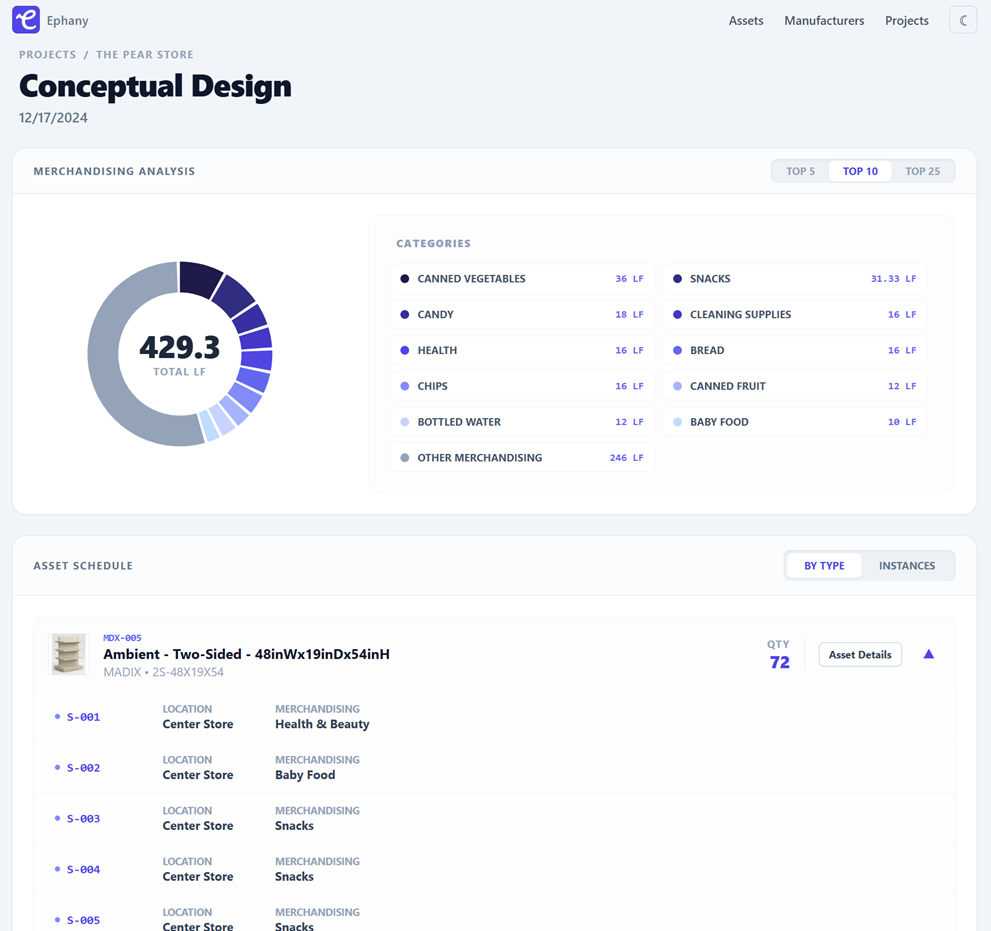
Stop manually updating PowerBI from Excel exports. With Ephany, your PowerBI dashboards can connect directly via the API. Or better yet, you can ditch PowerBI all together and build data visualizations in your own custom web app.
That’s exactly what we accomplished in this example. It’s a React web app built on top of the Ephany API which includes an asset browser and project-level merchandise category visualization. The source code can be found on GitHub: https://github.com/TripleZeroLabs/Ephany-UI-React
2. The Content Management System (Revit Addin)
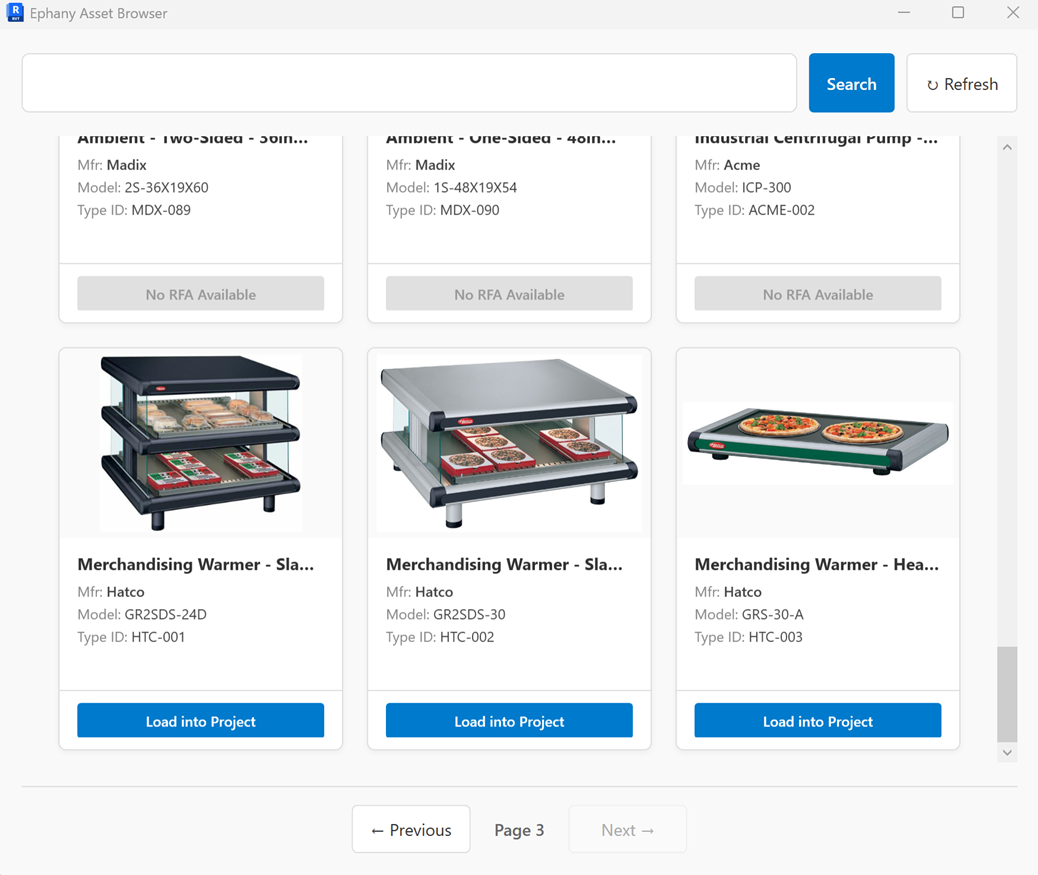
Instead of hunting for Revit families saved on a network drive or in Sharepoint, you can build a lightweight Revit add-in for searching and browsing your Ephany library.
Imagine having your very own customized version of Unifi or Content Catalog. With Ephany as a foundation, building your own BIM content management system should come easy.
Source code coming soon!
3. The AI Assistant (Coming Soon)
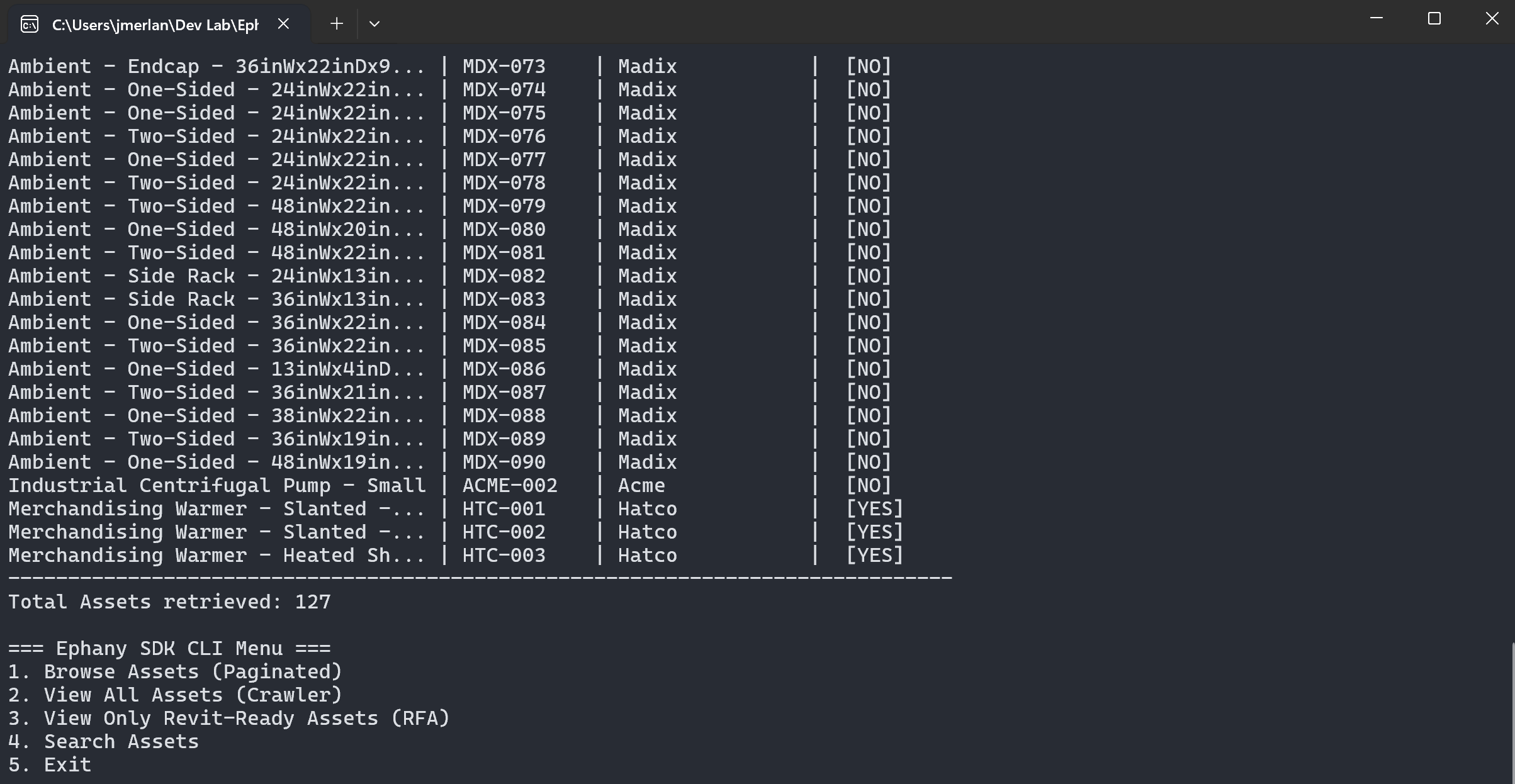
To prove how flexible this is, I am currently working on building a CLI Chatbot using Python and Google Gemini. I don’t have to “train” an AI on thousands of PDFs. I simply gave the AI permission to read the Ephany API. Now, I can ask plain English questions like:
"Which projects currently have the unapproved 'Generic Generator' loaded?"
The AI translates that question into an API call, gets the live data from Ephany, and reports back:
"I found 3 projects using the Generic Generator: The West Wing, Lab B, and the Parking Structure."
This tool is proving to be simple to build because the infrastructure (Ephany) is doing all the heavy lifting.
Stay tuned for an update on this project.
Your Data, Your Rules: The Open Source Advantage
There is one final, critical difference between Ephany and the commercial content management platforms you might be used to: You own it all. This includes both the source code and your data.
Ephany is open source. That means the code is free, transparent, and available for any organization to download and run on their own servers—whether that’s a secure cloud environment like Azure/AWS or a local server in your IT closet. Or you can even run a local version on your desktop/laptop for testing.
In an era of “subscription fatigue,” where every tool costs $50/user/month and holds your data hostage behind a paywall, Ephany offers a different path.
- Host Your Own Files: You aren’t just storing text. Ephany handles the storage of your Revit families (
.rfa), PDF specifications, and render textures. - Total Privacy: Because you host it, no third-party vendor sees your proprietary libraries or project data.
- No Lock-in: If you decide to move to a different system in 5 years, you don’t need to request an export. You already have the database!
It is your intellectual property. You shouldn’t have to pay rent to access it.
Conclusion
As Design Technologists, we spend most of our time wrestling with our tools and not enough time leveraging raw data.
Ephany represents a shift away from monolithic, “do-it-all” software toward a modular, connected ecosystem. Whether you want to build a simple automation script, a complex dashboard, or a chatbot that talks to your BIM models, it starts with having an API that listens.
Check out the Ephany framework on GitHub to see how you can start taking control of your asset data today: https://github.com/TripleZeroLabs/Ephany-Framework
Leave a Reply