
If you’ve ever worked with a large product catalog, a sprawling BIM library, or even just a massive shared drive, you’ve likely encountered the “Wild West” of naming conventions. It’s a tale as old as digital files themselves: what starts as an organized system can quickly devolve into chaos when multiple people are involved, each with their own logical (or not-so-logical) way of describing things.
At scale, this isn’t just an aesthetic problem; it’s a productivity killer. Inconsistent naming leads to:
- Difficulty in Searching: “Is it ‘Two-Sided’, ‘2-Sided’, or ‘Double-Sided’?”
- Data Inconsistencies: Downstream systems relying on structured data struggle with parsing.
- Training Headaches: New team members spend valuable time learning arbitrary naming quirks.
- Automation Roadblocks: Forget scripting tasks when the input data is a moving target.
- User Frustration: Engineers, designers, and sales teams just want to find what they need, fast.
One of our clients was certainly feeling these pains, especially with their extensive catalog of Madix shelving assets. They had everything from "Ambient - 36inWx21inDx42inH - Two-Sided - Standard Duty - Starter" to "MADIX - Two-Sided - Ambient - 21inD - 42inH - 36inW", and many variations in between. It was clear they needed a standardized approach.
Calling in the Cavalry: Google Gemini & Ephany Framework

My mission: rename all our Madix assets to follow a strict, consistent format:
Ambient - [Side Type] - [Dimensions] - [Duty Type] - [Other Info] - [Kit Type]
This was a simple set of rules, but given the existing inconsistencies, it was a task too tedious and error-prone for manual work… Perfect for automation. So, I turned to Google Gemini, my trusty AI assistant, and the powerful Ephany API.
My initial prompt to Gemini was pretty direct:
I need a Python script to standardize asset names. The Ephany API returns a list of assets (paginated), and I need to update the name and model fields. The only assets in the db I need to update have a manufacturer named "Madix". The current names are inconsistent, and I want to convert them to a standard format: Ambient - [Side Type] - [Dimensions] - [Duty Type] - [Other Info] - [Kit Type].

Here are the detailed rules:

- The name must always start with 'Ambient'.
- The second segment should be the 'Side Type': 'One-Sided', 'Two-Sided', 'Endcap', or 'Side Rack'.
- The third segment must be 'Dimensions' in the format [W]inW x [D]inD x [H]inH.
- The 'Duty Type' should only appear if the original asset name contained 'Heavy Duty'. If so, it should be 'Heavy Duty'. If neither, omit this segment.
- Any other descriptive words should go into an 'Other Info' segment.
- The 'Kit Type' ('Starter' or 'Add-On') should be the final segment if present.
- All segments should be separated by ' - '.
- The model number should also be updated: if the name is 'Heavy Duty', the model should end with '-HD'.
- Also, remove any color descriptions like 'Dark', 'Grey', 'Black'.

Provide the Python script.
After a few iterations (because, let’s be honest, even advanced AI needs a bit of hand-holding and debugging), we landed on a robust Python script. The key challenge was accurately identifying and extracting each segment, especially the Duty Type conditionally, and ensuring the Other Info wasn’t just a collection of leftover noise.
Here’s the Python script that brought order to our asset catalog on Ephany:
import os
import re
import requests
import logging
from dotenv import load_dotenv

logging.basicConfig(level=logging.INFO, format='%(levelname)s: %(message)s')
load_dotenv()

api_key = os.getenv("EPHANY_API_KEY_PROD")
env_base_url = os.getenv("EPHANY_BASE_URL_PROD")

if not api_key or not env_base_url:
    raise RuntimeError("Missing environment variables EPHANY_API_KEY_PROD or EPHANY_BASE_URL_PROD")

API_ROOT = env_base_url.rstrip('/')
HEADERS = {
    "Content-Type": "application/json",
    "Accept": "application/json",
    "X-Api-Key": api_key
}

ENDPOINTS = {
    "assets": f"{API_ROOT}/assets/",
}

def transform_madix_data(current_name, current_model):
    """
    Transforms Madix asset names based on specific presence of Duty and Kit types.
    """
    # 1. Detect if it should be Heavy Duty
    is_heavy_duty = False
    if "Standard Duty" in current_name or "Heavy Duty" in current_name:
        is_heavy_duty = True

    # 2. Setup cleaning filters for unwanted text
    colors = ["Dark", "Matte", "Grey", "Black"]
    side_types = ["One-Sided", "Two-Sided", "Endcap", "Side Rack"]
    kit_types = ["Add-On", "Starter"]

    # 3. Extract Dimensions using Regex
    dim_match = re.search(r'(\d+inW?x\d+inD?x\d+inH?)', current_name, re.IGNORECASE)
    dimensions = dim_match.group(0) if dim_match else ""

    # 4. Create a working string for 'Other' info by scrubbing known terms
    other_cleanup = current_name
    scrub_list = colors + side_types + kit_types + ["Ambient", "Standard Duty", "Heavy Duty", dimensions]

    for term in scrub_list:
        other_cleanup = re.sub(re.escape(term), '', other_cleanup, flags=re.IGNORECASE)

    # Clean up leftover dashes and extra whitespace
    other_info = other_cleanup.replace("-", " ").strip()
    other_info = " ".join(other_info.split())

    # 5. Determine side and kit values
    side_val = next((s for s in side_types if s.lower() in current_name.lower()), "Unknown")
    kit_val = next((k for k in kit_types if k.lower() in current_name.lower()), "")

    # 6. Build the Segmented Name array
    components = ["Ambient", side_val, dimensions]

    if is_heavy_duty:
        components.append("Heavy Duty")

    if other_info:
        components.append(other_info)

    if kit_val:
        components.append(kit_val)

    new_name = " - ".join([str(c) for c in components if c])

    # 7. Model Logic: Only add -HD if the name now contains "Heavy Duty"
    new_model = current_model
    if is_heavy_duty and not current_model.endswith("-HD"):
        new_model = f"{current_model}-HD"

    return new_name, new_model

def get_all_assets():
    """Fetches all assets by following pagination 'next' links."""
    all_assets = []
    url = ENDPOINTS["assets"]

    while url:
        response = requests.get(url, headers=HEADERS)
        response.raise_for_status()
        data = response.json()

        all_assets.extend(data.get("results", []))
        url = data.get("next")

    return all_assets

def run_update():
    try:
        assets = get_all_assets()
        madix_assets = [a for a in assets if a.get('manufacturer_name') == "Madix"]

        logging.info(f"Processing {len(madix_assets)} Madix assets...")

        for asset in madix_assets:
            asset_id = asset['id']
            old_name = asset.get('name', '')
            old_model = asset.get('model', '')

            new_name, new_model = transform_madix_data(old_name, old_model)

            # Only update if there is actually a change to save API calls
            if old_name == new_name and old_model == new_model:
                continue

            logging.info(f"Updating ID {asset_id}:")
            logging.info(f"  Old: {old_name} | {old_model}")
            logging.info(f"  New: {new_name} | {new_model}")

            payload = {"name": new_name, "model": new_model}
            patch_url = f"{ENDPOINTS['assets']}{asset_id}/"
            res = requests.patch(patch_url, headers=HEADERS, json=payload)

            if res.status_code != 200:
                logging.error(f"  FAILED - {res.text}")

    except Exception as e:
        logging.error(f"An error occurred: {e}")

if __name__ == "__main__":
    run_update()
I know that was a lot to take in, but most of it is the renaming function. However, the main takeaway from this post is really just two lines to focus on which demonstrate how easy it is to update asset metadata using the Ephany API… These two lines are the ‘wranglers’ that actually round up the new names and models and write them into the system:
        payload = {"name": new_name, "model": new_model}
        res = requests.patch(patch_url, headers=HEADERS, json=payload)
This is how simple it is to update asset information using the Ephany API. Just pass simple JSON as a PATCH request and you’re done. Are your automations gears turning yet?
The Results
Here you can see the dramatic difference our script made. No more head-scratching – just clear, consistent, sortable, and searchable asset names!
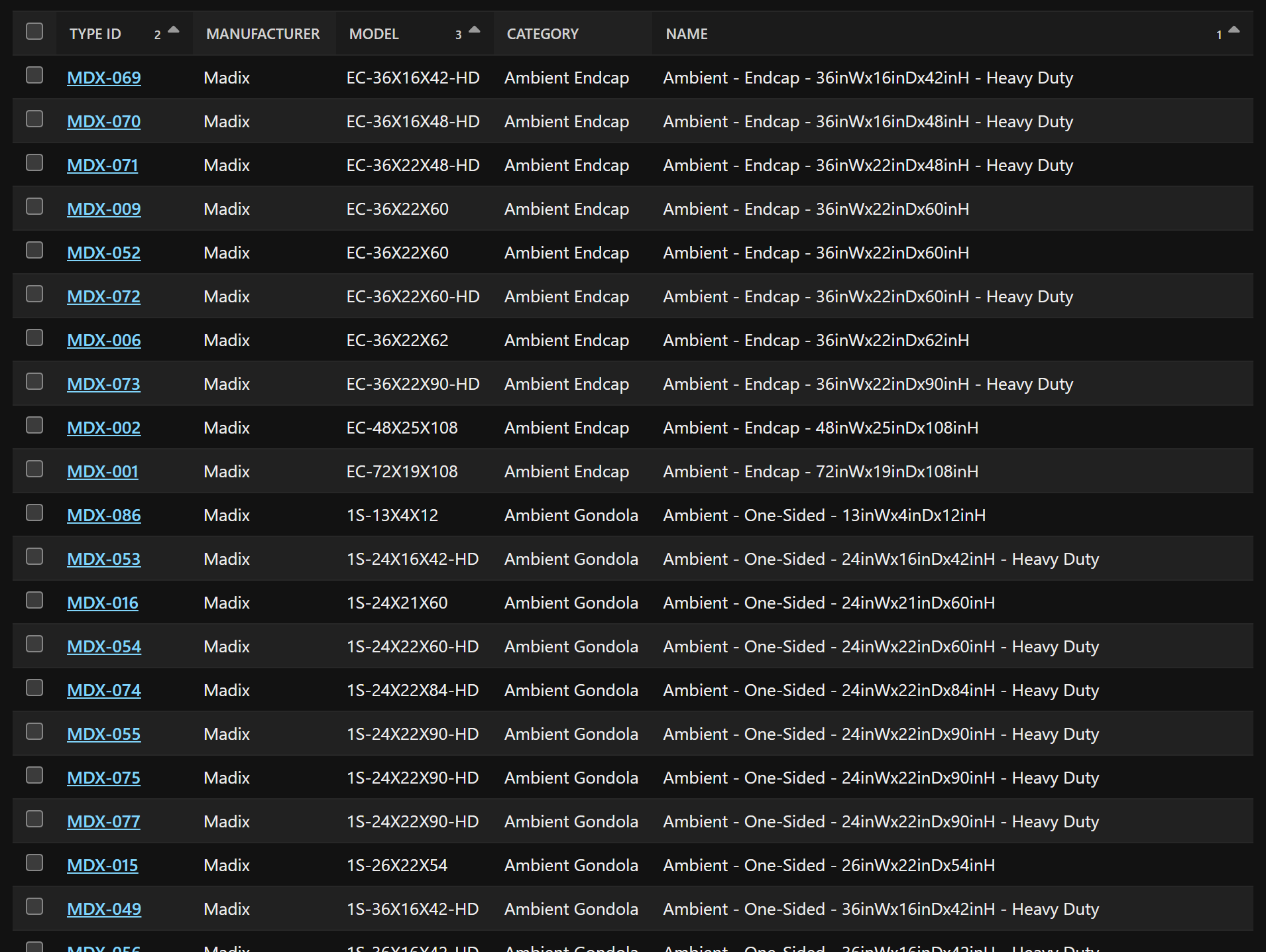
The Power of Automation with Ephany
This quick project perfectly illustrates how powerful it is to have an accessible API for your asset metadata. The Ephany API made it incredibly easy to not only fetch all our assets, but also to update specific fields programmatically. This kind of automation is a game-changer for maintaining data integrity and efficiency across an organization.
Did I mention I had hundreds of assets updated in less than an hour?
Next Steps
From here, the possibilities are endless. With our standardized asset names in Ephany, we can now easily connect the Ephany API to Revit projects and families to update the “Description” parameter, ensuring that our BIM models reflect the same high standard of naming. But that, as they say, is a blog for another day!
Resources
API documentation: https://documenter.getpostman.com/view/37222443/2sB3dVNnDe#8f3649e3-b4a6-4abf-ae26-e42387717186
Ephany Framework source code:
https://github.com/TripleZeroLabs/Ephany-Framework
Leave a Reply