Often times, you’ll want formulas to drive Yes/No parameters in parameter Revit families. There are a few methods for accomplishing this, but I recently stumbled on one that I haven’t seen in my 15+ years of Revit experience.
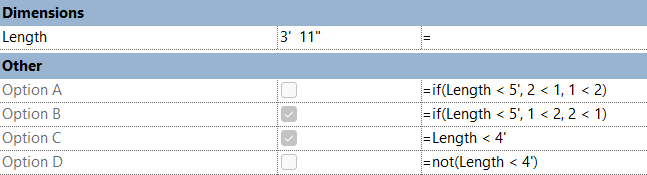
Typically, you will see formulas defined as a toggle and can negate a condition using the NOT operator as shown in parameters Option C and Option D below. However, did you know that Revit also understands 2 < 1 as NO and 1 <2 as YES? This allows IF conditional statements to toggle the parameter as needed.
Leave a Reply