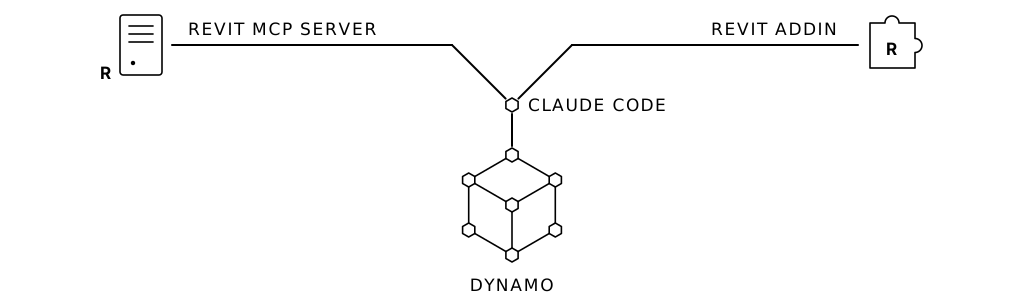
If you spend any significant amount of time wrangling Revit models, there is a very high probability you love Dynamo. And honestly, who can blame you? Visual scripting transformed Revit automation from an exclusive club of seasoned software engineers into an open playground for architects, computational designers, and BIM managers. Seeing nodes connect, manipulating geometry visually, and running custom logic without setting up a compiler fundamentally changed our industry for the better.
Lately, though, the BIM tech conversation has been dominated by Model Context Protocol (MCP) servers and AI agents operating directly inside design software. The immediate hot take making the rounds is: “Revit MCP is here to replace Dynamo.”
Let’s hit the brakes for a moment. Revit MCP servers will not replace Dynamo.
MCP is an extraordinary communication protocol, but it solves an exploratory problem, not a production problem. What will gradually retire your complex graph libraries isn’t a chat box running ad-hoc tasks, it’s AI-developed C# macros and compiled add-ins.
Here is why that distinction matters, and why embracing it is the most liberating upgrade your automation workflow will ever see.
1. Prompting the Same Automation Is a Waste of Time and Tokens (Even with Agent Skills)
- Probabilistic Risk: As sophisticated as agent skills are, they remain probabilistic. When 500 element parameters need to update across a critical submission set, you don’t want an LLM interpreting instructions. You want hardcoded, compiled determinism.
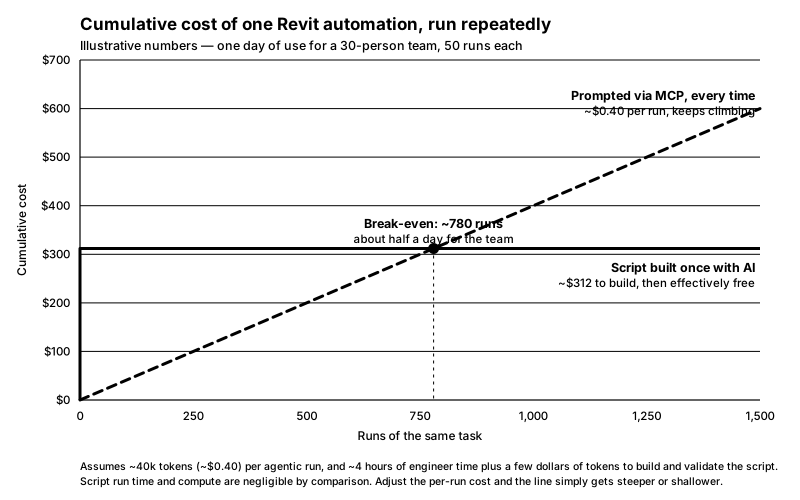
- Tokens and Compute Still Burn: A Skill tells the AI how to approach the task, but the model still has to make round-trip MCP tool calls, parse live model schemas, and generate responses on every single run. Running that dozens of times a day across a 40-person studio burns compute and budget unnecessarily.
- Latency vs. Instant Execution: Even with a finely tuned Skill, having an LLM deliberate through an MCP interaction takes seconds to minutes. A dedicated routine in Revit should run in a couple of seconds.
“Can’t we just package the instructions into an Agent Skill or custom prompt template?”
Yes, tools like Anthropic’s Claude Skills solve part of this by standardizing instructions and preventing you from manually typing out requirements every time. But while a Skill packages the thinking, it doesn’t change the runtime reality over MCP:
Claude Skills and MCP are phenomenal for discovery, reasoning, and prototyping. But using them as the end-state production runner for everyday Revit tasks is still using a sledgehammer where a toggle switch belongs.
2. We Still Need a Deterministic Package for Production
The true genius of Dynamo was never just the wires and nodes, it was the idea that a non-technical team member could develop a complex routine and then distribute it to the rest of their team to execute with a few clicks.
Chat environments don’t give us that. What we still need is:
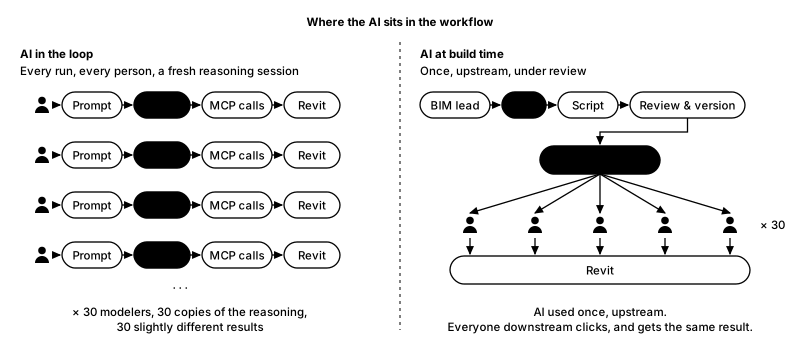
- Zero friction: A junior modeler facing a deadline shouldn’t be crafting prompts or babysitting a conversation window. They need a button in the ribbon or Dynamo Player that runs the same way for them as it does for the BIM lead. Prompting skill varies from person to person; a button doesn’t.
- Governance and quality control: BIM leads must know exactly what code is touching the central model: how transactions are wrapped and rolled back, how worksharing ownership is checked, what gets logged, and who reviewed it before it shipped. With a live agent, the “code” is generated at runtime and is different on every run. You cannot code-review what hasn’t been written yet.
- Scale across the firm: You cannot deploy a vague “prompt guide” as a firm standard. You need packaged, version-controlled, click-and-run utilities. When Revit updates or the office standard changes, you patch one package and everyone gets the fix—instead of re-educating thirty people’s prompts.
3. The Ideal State: Let AI Discover the Logic via MCP, Then Compile It to C#
Here is where the transition gets exciting (and why this isn’t an attack on visual programming). Dynamo was the first bridge that let non-programmers automate Revit. AI is the second bridge, and this one reaches all the way to an end product with shippable code.
Traditionally, the jump from Dynamo to a native Revit add-in (C# / .NET) felt like hitting a brick wall. Dynamo was accessible because it removed the requirements of building an actual plugin via Visual Studio, API reference DLLs, external commands, manifest files, transactions, and a recompile for every Revit version. For most practitioners, the learning curve wasn’t worth leaving the comfort of nodes.
AI turns that wall into a ramp. The friction is still there, but you’re no longer the one writing every line.
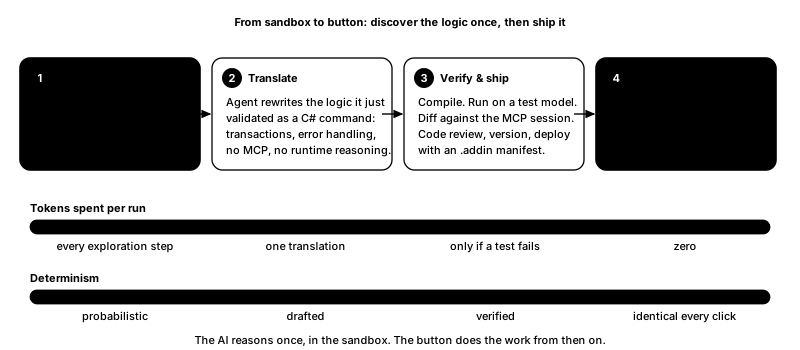
Think of MCP not as the replacement for your tools, but as your interactive testing sandbox:
- Exploration via MCP: You connect your AI agent to Revit through an MCP server and task it with the hard part: the edge cases, the element manipulation, the filters that never quite work on the first try. The agent experiments, reads the API docs, and verifies results live in the model. This is the expensive step, and it’s worth paying for… once.
- Translation: Once the workflow is validated, you don’t keep running that prompt. You ask the agent: “Take the logic you just validated and write it as a clean, standalone C# external command with standard transaction and error handling.” Note the word translation. The agent explored through the MCP server’s wrapper; the C# it writes is a port, not a copy.
- Verify and ship: Compile it. Run it on a copy of the model and diff the results against what the MCP session produced. Then treat it like any other firm tool: code review, version number,
.addinmanifest, deploy. This is where the governance from section 2 actually happens. - Rock-solid execution: From here on, nobody prompts anything. They click a button on the ribbon.
What do you get? A native Revit add-in that runs as fast as Revit itself allows, with no reasoning step in the middle. Zero tokens per run. No dependency on visual packages or custom nodes. And when a new Revit version does break it, it breaks at compile time with an error message you can read, not silently at runtime on a submission deadline.
The AI does the thinking once… in the sandbox. The button does the work from then on. You hired the architect to design the light switch; now everyone gets to flip it.
Evolution, Not Erasure
Dynamo taught a generation of BIM professionals how to think computationally via the Revit API: parameters, filtering, elements, geometry, and more. None of that is wasted. It’s exactly what makes you able to tell an AI what to build. The people who got good at Dynamo are the people best positioned to direct this.
So don’t settle for wrestling with graphs that break every updated, and don’t get trapped typing the same prompt into a chat window fifty times a day. Use MCP for what it’s good at: exploring, prototyping, working through the edge case you couldn’t crack on your own. Then let the AI do the work you never wanted to learn: turning that validated logic into a native Revit add-in your whole firm can click.
The architect designs the switch once. Everyone else just turns on the lights.
Leave a Reply